Hacking the Windows Shell: Custom Kiosk Architecture & Anti-Abuse in S-mon
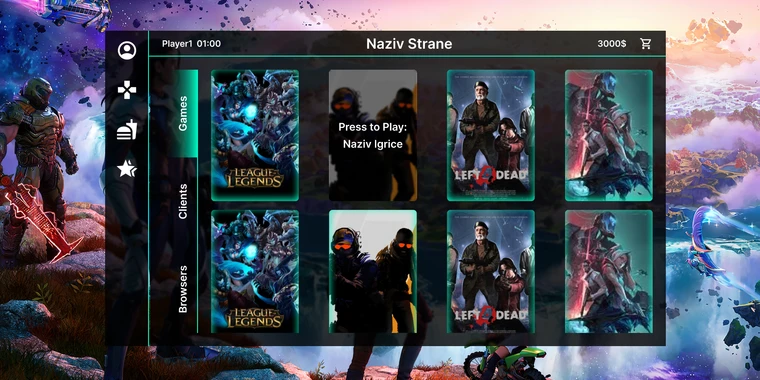
When managing commercial esports venues and LAN gaming arenas, standard desktop operating systems are a liability. Users will try to install arbitrary executables, bypass billing timers, kill watchdog processes, modify registry values, or pull off USB-based privilege escalations.
For S-mon—our end-to-end game facility management and kiosk platform—we took a radical approach: we completely stripped out explorer.exe, replaced the Windows default desktop shell with a custom Flutter application, and wrote low-level Windows background services to lock down the operating system.
Here is how we architected the system, interfaced Dart with the Win32 API, and built anti-abuse mechanisms that survived real-world attacks.
The System Architecture
A kiosk terminal in S-mon operates across three distinct privilege rings:
+-------------------------------------------------------------------+
|                        User Session (Desktop)                     |
|                                                                   |
|   +-----------------------------------------------------------+   |
|   |         S-mon Kiosk Shell (Flutter / Dart FFI)            |   |
|   |  - Custom Taskbar, Game Launcher, Time Tracking Overlay   |   |
|   +-----------------------------------------------------------+   |
+-------------------------------------------------------------------+
                                  |
                                  | Named Pipes / Local IPC
                                  v
+-------------------------------------------------------------------+
|                   SYSTEM Ring (Windows Services)                  |
|                                                                   |
|   +-----------------------------------------------------------+   |
|   |             S-mon Supervisory Service (C++/Go)            |   |
|   |  - Keyboard Hook (WH_KEYBOARD_LL)                         |   |
|   |  - Process Watchdog & Job Object Sandbox                  |   |
|   |  - Hardware Sentinel (USB / Display Monitoring)           |   |
|   +-----------------------------------------------------------+   |
+-------------------------------------------------------------------+
                                  |
                                  | Secure WebSocket (TLS)
                                  v
+-------------------------------------------------------------------+
|                       Cloud / Local Gateway                       |
|   +-----------------------------------------------------------+   |
|   |                  NestJS Backend Server                    |   |
|   |  - Session Lease Auth, Billing Engine, Remote Admin Kill  |   |
|   +-----------------------------------------------------------+   |
+-------------------------------------------------------------------+
Replacing the Windows Shell
In Windows, the shell is configured in the registry at:
HKLM\SOFTWARE\Microsoft\Windows NT\CurrentVersion\Winlogon\Shell = "C:\Program Files\S-mon\smon_shell.exe"By substituting explorer.exe with our compiled Flutter executable, Windows starts directly into our UI without the default taskbar, start menu, desktop icons, or Win+X shortcuts.
However, running as a custom shell means you are responsible for window management, multi-monitor display coordinates, system tray emulation, and handling display resolution shifts when games launch in exclusive fullscreen mode.
Interfacing Dart with Win32 via FFI
We utilized Dart’s dart:ffi to invoke native Windows APIs directly from the Flutter UI runtime:
import 'dart:ffi';
import 'package:ffi/ffi.dart';
import 'package:win32/win32.dart';

class WindowManager {
  static void makeTopmostAndBorderless(int hwnd) {
    // Remove title bars and borders
    final currentStyle = GetWindowLongPtr(hwnd, GWL_STYLE);
    final newStyle = currentStyle & ~WS_CAPTION & ~WS_THICKFRAME;
    SetWindowLongPtr(hwnd, GWL_STYLE, newStyle);

    // Set Window position to cover entire primary monitor
    final screenWidth = GetSystemMetrics(SM_CXSCREEN);
    final screenHeight = GetSystemMetrics(SM_CYSCREEN);

    SetWindowPos(
      hwnd,
      HWND_TOPMOST,
      0,
      0,
      screenWidth,
      screenHeight,
      SWP_FRAMECHANGED | SWP_SHOWWINDOW,
    );
  }

  static void lockWorkstation() {
    LockWorkStation();
  }
}
Low-Level Anti-Abuse & Hardware Watchdogs
[!WARNING] Threat Model: If a user can open Task Manager or launch
cmd.exevia hotkeys likeCtrl+Shift+EscorAlt+Tab, they can kill the shell process and regain full administrative access to the machine.
To prevent this, our background service installed low-level system hooks and enforced Windows Job Objects.
1. Intercepting System Keys with WH_KEYBOARD_LL
#include <windows.h>

HHOOK hKeyboardHook;

LRESULT CALLBACK LowLevelKeyboardProc(int nCode, WPARAM wParam, LPARAM lParam) {
    if (nCode == HC_ACTION) {
        KBDLLHOOKSTRUCT *pKey = (KBDLLHOOKSTRUCT *)lParam;

        // Block Windows Key (LWIN & RWIN)
        if (pKey->vkCode == VK_LWIN || pKey->vkCode == VK_RWIN) return 1;

        // Block Alt + Tab
        if (pKey->vkCode == VK_TAB && (pKey->flags & LLKHF_ALTDOWN)) return 1;

        // Block Alt + Esc
        if (pKey->vkCode == VK_ESCAPE && (pKey->flags & LLKHF_ALTDOWN)) return 1;

        // Block Ctrl + Esc
        if (pKey->vkCode == VK_ESCAPE && GetAsyncKeyState(VK_CONTROL) < 0) return 1;
    }
    return CallNextHookEx(hKeyboardHook, nCode, wParam, lParam);
}
2. Job Objects for Hard Process Containment
When a customer launches a game (e.g., Cyberpunk, Valorant, CS2), the game process is spawned inside a restricted Windows Job Object.
If the user’s paid time expires:
- The NestJS backend fires a WebSocket lease expiration event.
- The S-mon service instantly calls
TerminateJobObject(hJob, 0). - Every sub-process, child thread, and audio stream attached to the session is atomically terminated within 5 milliseconds—leaving zero orphaned processes or memory leaks.
The NestJS Backend & Real-Time Lease Management
The central management server is built with NestJS, utilizing WebSockets (Socket.IO / ws) for bidirectional communication between 100+ venue kiosks and cashier admin panels.
@Injectable()
export class KioskSessionGateway {
  @WebSocketServer()
  server: Server;

  @UseGuards(KioskTokenGuard)
  @SubscribeMessage('heartbeat')
  async handleHeartbeat(@ConnectedSocket() client: Socket, @MessageBody() data: KioskMetricsDto) {
    const session = await this.sessionService.verifyActiveLease(data.terminalId);

    if (!session || session.remainingSeconds <= 0) {
      client.emit('session_lock', { reason: 'LEASE_EXPIRED' });
      return;
    }

    // Sync remaining time to client display
    client.emit('time_sync', { remainingSeconds: session.remainingSeconds });
  }
}
Lessons from Operating in Production
- Never trust client-side timers: Time tracking must exist exclusively on the server, with the client acting as a dumb renderer and state reflector.
- Graphics driver crashes are inevitable: If an AMD/NVIDIA driver resets, standard Flutter desktop windows can lose their DirectX swapchain. We implemented a recovery watchdog that reinstantiates the surface without dropping active games.
- Flutter on Windows is remarkably resilient: Dart’s FFI performance allows calling 60+ Win32 APIs per second without dropping frames on 240Hz gaming monitors.